IMPORTANT: The Utilities tab displays if Carbon Performance Manager is enabled. See Extensions.
This page displays all Utilities assigned for data entry. To display data on the Utilities page, from the Sites drop-down menu, select a Site. The Utilities assigned to the Site display in the grid. See Sites. Once you select a Site, the country and state/city assigned to the Site display above the grid.
Utilities Data Entry
To enter data for Utilities, complete the following steps:
-
Select a Utility from the grid and then select the New button to add an entry for that Utility.
-
Enter all Utility data in the slide-out panel.
-
If a Control List is assigned to the Utility, there will be a drop-down menu with the Control List title. From the drop-down menu, select a Control List member to enter data for that selection. See Control Lists.
-
The Unit Type drop-down menu defaults to Energy. No selection is needed.
-
From the Unit drop-down menu, select a unit.
-
In the Value field, enter your value for the Utility. The value must be numeric. You cannot enter a value exceeding 1019-1. Converted values also cannot exceed this number.
If the input basis is periodic, the Value field indicator displays the current workflow time. If the input basis is YTD, the Value field indicator displays a range from the current workflow starting period to the current workflow time.
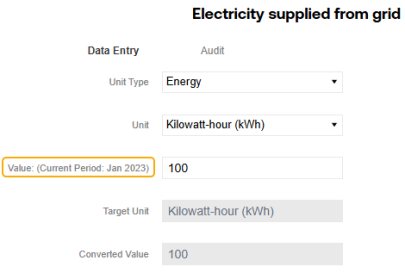
NOTE: The Target Unit and Converted Value fields cannot be edited. Once you save the entry, these values will display in the corresponding column grids.
-
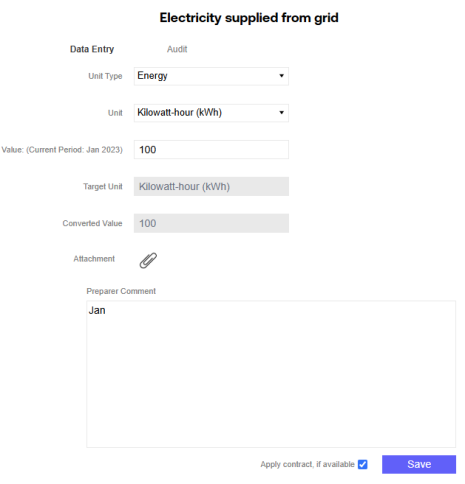
Add an attachment or preparer comment if needed. If a preparer comment is required, the entry cannot be saved until the comment is added. See Attachments and Comments
-
The Apply Contract, if available checkbox is selected by default. When deselected, the data entry is not impacted by a matched contract, which changes the market‑based calculation result.
NOTE: This checkbox only displays if you are a OneStream Administrator, Solution Administrator, or in the user group assigned to the Advanced Contract Data Entry role. See Global Options.
-
Select the Save button.
Utilities Data Audit
The Audit tab enables you to view all changes made to the selected entry. The tab displays all historical entries made, the user who made the entry, and the timestamp for the entry. The grid lists entries from newest to oldest.

